Q4. How did you use media technologies in research, planning, construction & on evaluation?
Construction was another major aspect as we had to use different forms of technology to bring our project together. We had to use multiple pieces of software and hardware, to create our project and portray the storyline of our film. We had to learn new skills so that we could create more advanced features within our trailer.
Production
To create the footage we filmed the shots using a Canon camera, which gave us high quality shots, we used a camera stand as well to ensure that the shots were steady and were not wobbly. We also used a microphone that came with the camera to record the voiceover, this meant that the voice over was clear and steady and when we edited it the quality was not ruined. We also used torches as a form of lighting for some shots, for example when she awakes in the alternate world we shone torches to the camera to allude the idea that the character is awaking in a new location. We also used torches for the camping scene, as it may have still been light, but when we watched it backed while filming you could not see anything, so we shone torches at the characters to make the lighting brighter so that she could clearly be seen, but the viewers could still see that it was dark enough and was the middle of the night.

Post Production
Premiere Pro CS6
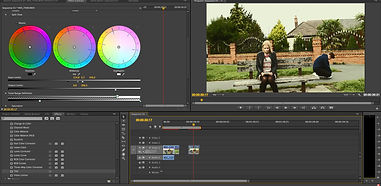
We used premiere pro for a variety of things, however the main one being to piece our trailer together, it had tools like cutting down the footage which we could then add, we could move the sections of footage around, allowing us to have plenty of freedom when we changed the order of the scenes around. This was particularly useful, as typical trailers are in anachronic order, and so we kept switching scenes around as it was hard to chose a right order for the clicks when a trailer is not supposed to be in order, but it still had to be understandable for the viewers. Premiere Pro also tools like reversing or speeding the footage which, altering the brightness/contrast of the shot and most importantly the different transitions that we could add, there was a variety available which meant that we could add the one that matched the tone of shot the best.


Here is the CCTV tutorial that we used to create our own CCTV footage.


After Effects
After effects is what we spent most of our time using, and developing our skills with, we followed a lot of tutorials on Youtube for using after effects to create the post-modernism effect to our trailer, we searched through lots of tutorials until we found the correct trailer that we wanted. After effects was used specifically in our trailer to create the blinking effect, titles, credits, and the CCTV footage. After effects gave us plenty of freedom to design the exact look that we wanted, as each effect has lots of adjustments that can be made, meaning the correct post-modernism look was made.
Garage Band
Due to the experience that my peer and I had with Garage Band we knew how to use the software, and so with the knowledge that we gained from last year and the skills that we developed with the help from tutorials and our combined knowledge; it meant that we could create an effective sound track with plenty of sound effects. This allowed the tone of the scene to be what we wanted and the connotations that people would make. One sound effect that we added that created a major impact was when Lucy awakes in the alternate world, and as her eyes open a loud thunder clap is overlapped with the music to create a transition of the new location. Garage Band has premade melodies and tunes alongside prerecorded sound effects that happen in every day like for example a car engine or birds tweeting, this came in handy as we developed out soundtrack through lots of loops that were already made and added on more on top of it, to create a more meaningful and advanced soundtrack. An example of a sound effect that we also used that was available to us on Garage Band was the sound of rain falling when there is a thunderstorm while she is camping. The more we developed our skills on Garage Band, the more we started to understand of what did not sound right and what needed to be changed, for example, we changed the pitch and tempo of certain loops so that it sounded right and matched the action of the shot it was being played against with the rest of the loops that were being played at the same time.


Photoshop
Photoshop was a huge help in making our final products, which were the magazines and posters. It had a wide range of tools that allowed us to design and form a unique product that would engage audiences and boost ticket sales. While I was creating my poster it took a while to gain inspiration for what I could add to make it eye catching for audiences walking by, therefore I experimented with the filters that would change the colours of the poster, this would invert the colours or make it neon. In the end I choose to use a high contrast and coloured filter, that made it seem catatonic, which is very similar to the effect that we have in our trailer.

Here are my design design experiments when I was deciding with filters, I wanted to find a filter that stood out to people walking past and would catch their attention, and so the bright colours in my final poster fit this perfectly.
Wix


Wix was another way that helped us to complete our final product was to create a website for our film, Siblings, we added a variety of different pages that users could get involved with. Wix was simple to use as it was self explanatory, and gave us plenty of freedom to move around objects and adjust pages, we could upload videos from you tube and connect our social media sites to the websites, creating more interaction for users.